This article describes Flow Classic, the previous version of Flow. Some screens and features may differ from the new app.
Store Management Page
[Settings] → [Shops] to display the shop list
[Edit] to edit existing store information, or [Add] to register a new store. (* is a required field.)
Input information for each shop
Field | Description |
Store Name | Please enter the store name. In some features, the first 3-4 characters will be displayed as the store name. |
Store Code | Enter the store code. If you’ve already assigned store numbers when managing POS data or similar, please make sure the values match. |
Brand | Please select the brand of the store. For creating a brand, see here |
Store Type | Please choose whether it’s a roadside store or located in a facility. |
Status | Please select open or closed. If closed, the data for the relevant store will no longer be displayed. |
Floor Height | Please enter the height from the floor. |
Opening Date | Please select the starting date for measurement. |
Closing Date | Please select the measurement end date. (Edit only) |
Store Sales Area | Please enter the floor area in tsubo. |
Country | For overseas stores, please contact ([email protected]). |
Place | Please select East Japan or West Japan. |
Region | Please select a region like Kanto or Kansai. |
Prefecture | Please select a prefecture. |
City/Town/Village | Please select a city. |
Contact Number | Please enter the store’s phone number. |
Store Address | Please enter district, block number, building name, etc. |
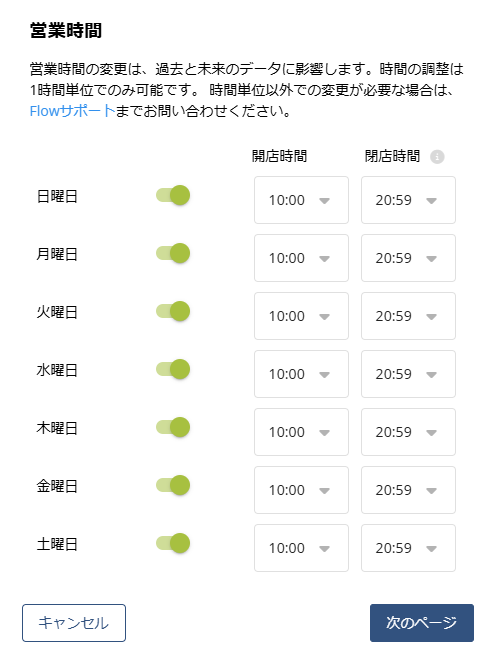
Setting Business Hours
If there are regular store closure days, please check the applicable days.
For [Operating hours], please select the opening and closing times. (If there are 30-minute closure timings, separate configurations are required, so please contact us here ([email protected]).)
Select [Save] to complete the process.
If you’re setting up multiple stores at once, please refer to the information below.
[Flow Classic] About Importing
We will explain how to import various data and settings.
That's it. If you have any questions, please contact support ([email protected]).