

Calculating Reference Values from Traffic Trends
Based on the traffic pattern from opening to closing, set target budgets and number of purchases by time slot.
Setting hourly targets and reviewing results lets you course-correct quickly during business hours, helping prevent KPI drops and increasing the likelihood of hitting your budget.
Understand the Traffic Pattern
Calculate the daily traffic pattern as a percentage breakdown, based on Power Hour compared to the same day of the week last year.
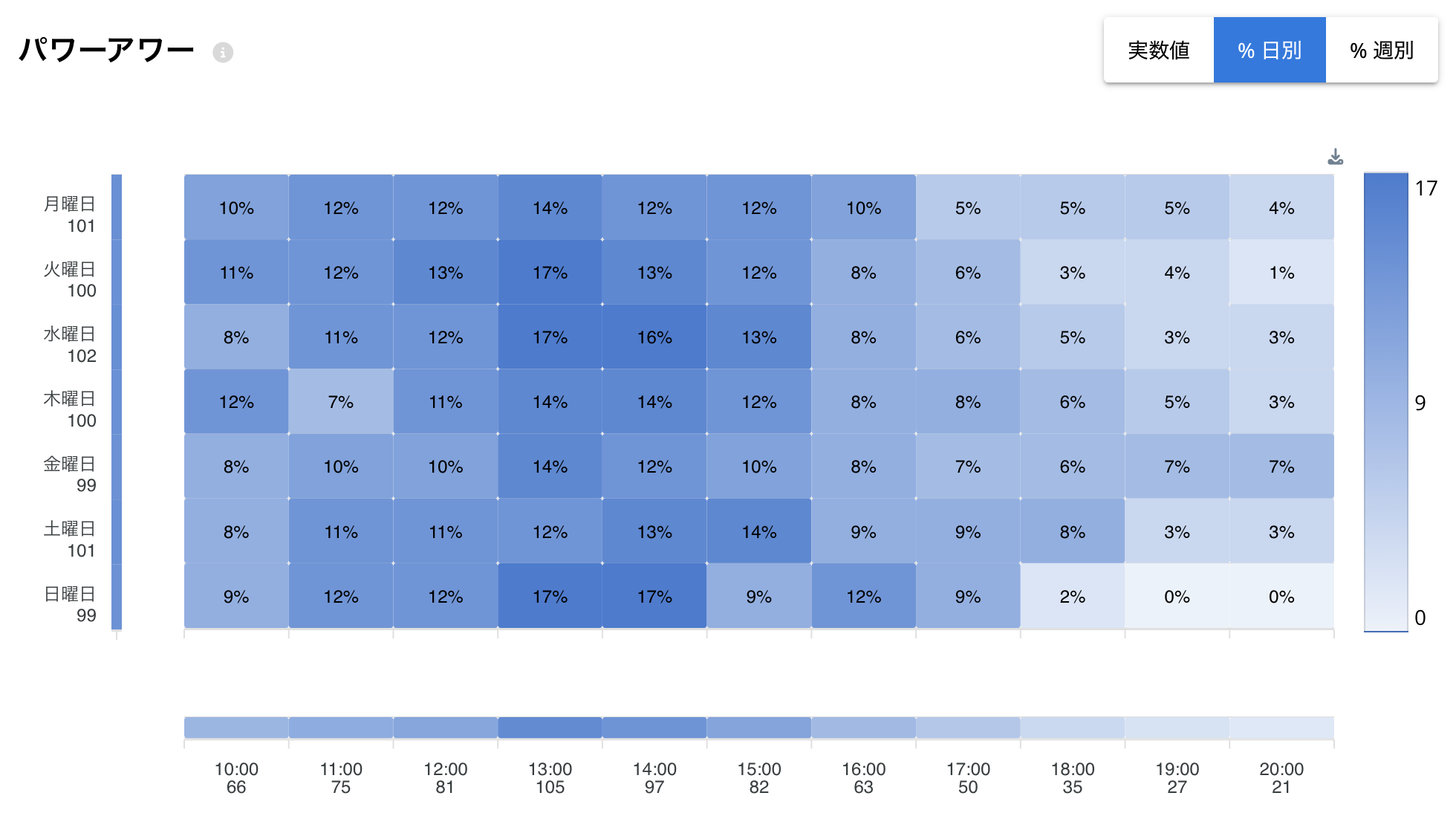
Download it as a CSV to Excel/Google Sheets and use it there.
Set Targets by Time Slot
Allocate the traffic percentage across sales and each KPI.
Example:
Daily budget: ¥200,000 Projected traffic share at the 10:00 hour: 4%
¥200,000 × 0.04 = ¥8,000
Review
Use "Home" or "KPI Analysis" to review results by time slot, find any items where the KPI is below last year, and course-correct quickly.
For more detail on how to review this, see the Daily Report and Weekly Report articles.
If you have any questions or concerns, please contact us via chat on the Flow site/app, or at [email protected].